Wednesday, 26 November 2014

Order Management User Defined Attributes

Oracle Order Management enables to record additional information at order and line levels using user defined attributes.

 These attributes are aggregated in user-defined attribute groups


We must associate attribute groups with a particular business classification, which in the case of Order Management is the predefined classification, ADMIN_DEFINED.


An attribute group can have a maximum of 40 character fields, 20 number fields, and 10 date fields.

However, We can associate as many attribute groups as we want to an UDA page which makes the number of additional attributes to an order or line unlimited.

For each user-defined attribute, we can optionally specify a value set,with data type and validation rules to be applied when the user inputs data

Multi-row attribute groups enable association of multiple sets of attribute values with the same attribute group

single-row attribute groups allow a single attribute value for the attribute group


We can create attribute pages to capture details of each attribute group

The attribute pages enable Us to view or edit data of attribute groups for a selected object instance based on access permissions.

To create an attribute group and add attributes

Navigation  Setup > Orders > User Defined Attributes


Choose Entity

Click Create

Create a Attribute Group

Here We Define Name , Single Row or Multiple Row Details.


Then Click Apply and Add Attributes .

Add Attribute Name , Value Set , Default Value and Click Apply.


To associate attribute group with a classification

Click On the Association Tab

Click Add Attribute Groups in the Associations page


Clicking Apply adds the attribute groups to the predefined classification, ADMIN_DEFINED.  

To create UDA pages

In the OM UDA Page Setup page under the Page tab.


Click Create Page


Add Attribute Group to Page .


In Sales Order Header , Actions , Select User Defined Attributes

OAF Page Will open.

We Can Add the Values to Attributes .


Tuesday, 25 November 2014

Implementation Option and Overview Space Management

 Space Assignment

Oracle Property Manager has two system options that affect space assignment functionality:

Automatic Space Distribution
Use SYSDATE to Record each Space Assignment
Use the Space Assignment window to assign, modify, search, and view space assignments

We can assign locations to employees and cost centers

We can query all space assignments for a particular building, floor, office, land, parcel, or section. 

customer space assignment Can be created only thro Lease

 A location is automatically assigned to a customer when you add a location, with a customer, to a revenue lease.

As of Date
When creating a new assignment, the As of Date is the default From date.

Ability to modify space assignments based on an As of Date depends on how the Use SYSDATE to Record Space Assignment system option is set.

If you enter a date, all space assignments active as of the date you entered are displayed.
Oracle Property Manager also keeps track of additional office space information, including:
  • The space available (vacant space) in a building, floor, office, land, parcel, or section on a particular date.
  • The space at any location that is rentable.
  • The space at any location that is usable.
  • The space at any location that is assignable.
  • The occupancy level at the building, floor, or office level, and the land, parcel, or section level.


Sunday, 23 November 2014

Define Office -Oracle Property Management

Defining Offices

You need to define individual offices so you can

1.Keep track of information about the office

2.Associate the office with a specific lease in the Leases window

3.Assign employees and customers to specific offices, using the Space Assignment window

If you select the Common Flag check box, the Assignable field is disabled .
Bookable locations are usually locations such as conference rooms that users can book for meetings and other events


 As we enter information in the Area tabbed region of the Office window, Property Manager summarizes the amount of vacant office space on each floor and in each building, and displays the total in the Vacant fields in the Floor and Building window .

when you assign office space in the Employee Space Assignment window, the amount of vacant space displayed in the Building and Office windows decreases as you assign office space to employees .


Navigation

Property Manager → Building → Floors → Office


Friday, 21 November 2014

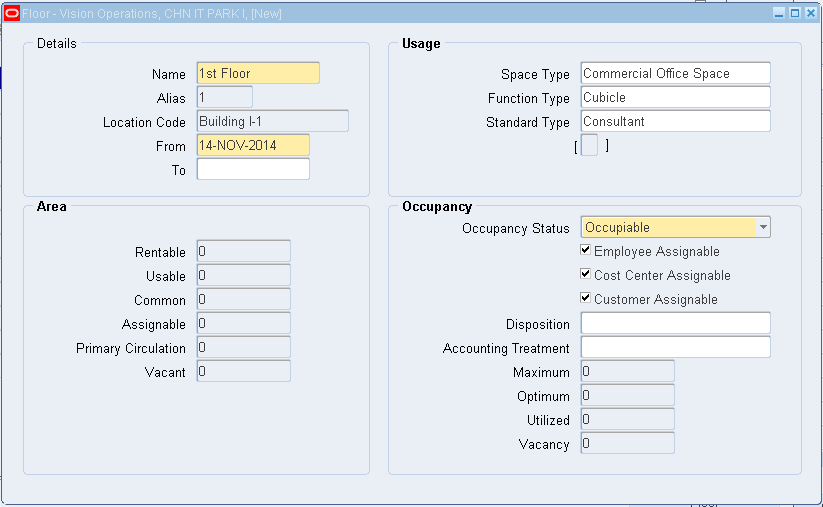
Define Floors - Oracle Property Management

Defining Floors

Enter the name of each floor you are defining

Create an alias for the floor

Specify the Occupancy Status of the floor and whether it is assignable to employees, cost centers, or customers

All locations, including floors and offices inherit Occupancy Status and assignability from their parent location

A floor that is part of an unassignable building cannot be assignable. Similarly, offices that are part of unassignable floors cannot be assignable.
When you change a parent location from unassignable to assignable, the system cascades the changes to the child locations without performing assignment checks.
In the Usage region, optionally enter the space type, function type, and standard type .


Navigation


Property Manager → Building → Floors


Define Buildings -Oracle Property Management

Defining Buildings

Navigation

Property manager → Property Definition → Building

If you navigate to the Buildings window by choosing New Building on the Properties window, Oracle Property Manager sets the Operating Unit, Property Name, Tenure, and Country fields automatically. All these fields, except Tenure, are read-only.

Enter Unique Name and Code for Building

Create an alias for the building .
The building alias that you create will become the first element of thelocation code
If you set up floors and offices, their aliases will become the second and third elements of the location code.


The following tables show how you can use a combination of abbreviations, and floor and office numbers to create your aliases


Name Alias Location Code
Building CHN IT PARK I Building I Building I
Floor 1st Floor 1 Building I-1
office CHN Techno Soft CTS Building I-1-CTS


In the Area Tabbed Region Enter UOM and Gross Measurement of the Building


In the Occupancy tabbed region

Status: Specify whether the building is classified as occupiable for reporting purposes

Disposition: Specify why the building is non-occupiable
Accounting Treatment: Specify the financial status of the building.

The Employee Assignable, Cost Center Assignable, and Customer Assignable fields control whether you can make assignments to the location.


In the Features tabbed region, enter the type, description, and condition of each building feature.

    • Type: This is a description of how the building will be used, for example, Retail Shop.
    • Description: Enter a description of the building, for example, the name of the restaurant.
    • Condition: Enter the condition of the building, for example, Excellent, Fair, or Poor.

In the Contacts tabbed region, enter the type (role), company name, and site of each contact.
    • Type: Enter the role of the contact, for example, facilities manager or landlord.
    • Company Name: Enter the name of the contact's company.
    • Company Site: Enter the location of the contact's place of business.


Friday, 14 November 2014

Creating Property -Oracle Property Management


Define Property

Navigation : Property Manager → Property Definition → Property

Select the operating unit for which you want to create the property. Once you save the property, you cannot change the operating unit.

Enter the Property Name and Property Code.

Indicate whether the tenure of the building is leased, owned, managed, or mixed .


Enter the country where the building is located.


Countries and Territories Property Management

Countries and Territories

Use the Countries and Territories window to maintain Value-Added Tax (VAT) Member State Codes, and to select an address style for a particular country or territory .

The VAT Member State Code identifies a country or territory as belonging to the European Union (EU) .

Special Value-Added Tax rules apply to member states of the EU.

Address styles specify how Oracle Property Manager should format the address fields so that they best suit the address entry requirements of a particular country .

Navigation


Property Manager → Setup → International → Countries

Query the Country

Modify any of the following fields:

Country/Territory: The name of the country or territory
Description: The description of the country or territory
VAT Member State Code:The member state code for a country belonging to the European Union (EU)
Address Style: The address style to be used with the particular country