| Below are the List of Setup Steps for Oracle Order Management | |||
| 1.Define multiple organizations in Oracle Inventory | |||
| 2. Setup Multi-Org (Multiple Organization) Access Control | |||
| 3. Define key and descriptive flexfields | |||
| 4. Define inventory organizations (warehouses), parameters, subinventories, and picking rules in Oracle Inventory | |||
| 5. Define Profiles | |||
| 6. Setting OM System Parameters | |||
| 7. Define invoicing information | |||
| 8. Define your sales representatives | |||
| 9. Define Tax Features | |||
| 10. Define Quickcodes | |||
| 11. Define header and line processing flows | |||
| 12. Define Document Sequences for Order Numbering | |||
| 13. Define Order Import Sources | |||
| 14. Define the units of measure | |||
| 15. Define item information | |||
| 16. Define the items that you sell | |||
| 17. Define the configurations that you sell | |||
| 18. Define price lists | |||
| 19. Define customer profile classes | |||
| 20.Define information on your customers | |||
| 21. Define item cross references | |||
| 22. Define your sourcing rules | |||
| 23. Define Order Management Transaction Types | |||
| 24. Set up Cost of Goods Sold Accounting flexfield combination | |||
| 25. Define Processing Constraints | |||
| 26. Define Defaulting Rules | |||
| 27.Define Credit Checking Rules | |||
| 28. Define Automatic Holds | |||
| 29. Define Attachments | |||
| 30. Define Freight and Special Charge Types | |||
| 31. Define shipping parameters |
Tuesday, 6 October 2015
Oracle Order Management Setup Steps

Saturday, 19 September 2015
Process Parameters in Oracle Process Manufacturing
A process parameter details information such as temperature, pressure, or time that is pertinent to the product, but does not fall into the classification of input or output.
Process parameters can be used as set points, comparison values, or in conditional logic.
OPM enables the association of process parameters to a resource, at the resource level within an operation and a recipe, as well as at the production batch level.
If the Parameter type is Numeric Range, then the Target field can be defined at the generic resource. The Target, Min, and Max value fields can be overridden at the recipe resource level. Once a batch is created, the actual value is the only field that can be entered.
If the Parameter type is List of Values, then no overrides can be made. Once a batch is created, the actual value is the only field that can be entered.
If the Parameter type is Text, then the Target value can be defined at the generic resource and overridden at the recipe resource level.Once a batch is created, the actual value is the only field that can be edited.
If the parameter is added directly to a batch, then the Target field can be entered, and the Min and Max fields can be entered if it is a numeric type.
If the Parameter type is List of Values, then no overrides can be made. Once a batch is created, the actual value is the only field that can be entered.
If the Parameter type is Text, then the Target value can be defined at the generic resource and overridden at the recipe resource level.Once a batch is created, the actual value is the only field that can be edited.
If the parameter is added directly to a batch, then the Target field can be entered, and the Min and Max fields can be entered if it is a numeric type.
- Navigation : Process Engineer >>Setup>>Process Parameter >> Define process parameters

Monday, 31 August 2015
Oracle ASCP Organization Security
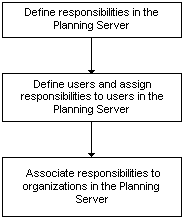
This feature restricts plan information access to authorized individuals. Oracle ASCP allow users to associate job responsibilities to organizations for security purposes.
Define custom responsibility in the Planning Server.
Navigation --> System administrator -->Security -->Responsibility -->Define

Define users and assign responsibilities
Navigation : system administrator -->Security -->User --> Define

Assign Organization to Responsibilities
navigation :Advanced Planning administrator -->admin -->Organization Security
 Save the Work .
Now User having Responsibility "ASCP_Supply chain Planner" Can View/Update Plans for Organization "TST:AM1"
The following diagram illustrates the procedure flow for assigning users and job responsibilities to organizations:
Define custom responsibility in the Planning Server.
Navigation --> System administrator -->Security -->Responsibility -->Define

Define users and assign responsibilities
Navigation : system administrator -->Security -->User --> Define
Assign Organization to Responsibilities
navigation :Advanced Planning administrator -->admin -->Organization Security
Save the Work .Now User having Responsibility "ASCP_Supply chain Planner" Can View/Update Plans for Organization "TST:AM1"
Subscribe to:
Posts (Atom)